How to Track Flaky Tests in Playwright
Flaky tests are the slow leak in your CI pipeline. They don’t break the build consistently enough to demand immediate attention, but over time they erode trust in the entire test suite. Developers start ignoring red builds. Re-running pipelines becomes a reflex rather than a signal. The tests are still there — they just no longer mean anything.
This article covers what causes tests to be flaky in Playwright, how to use Playwright’s built-in retry mechanism to surface instability, and how to track flakiness across runs so it becomes something you can actually measure and fix.
What Makes a Test Flaky
Flakiness is non-determinism. The same test, on the same codebase, produces different results across runs. A few root causes account for the majority of cases.
Timing issues are the most common. A test that clicks a button and immediately asserts on a result is betting that the UI responds faster than the assertion fires. Playwright’s auto-waiting handles a lot of this, but it is not foolproof — especially when developers set explicit timeouts that are too short:
// This test is flaky — it depends on animation timing
await page.click('.submit-button');
await page.waitForSelector('.success-message', { timeout: 1000 });
A 1000ms timeout may pass 90% of the time on a fast CI runner and fail 100% of the time on a slow one. The underlying problem is not the timeout value — it is that the test is racing against a side effect it does not fully control.
Network dependencies introduce flakiness when tests make real HTTP calls to external services or when API mocks are not set up correctly. A mocked endpoint that returns data inconsistently, or a test that hits a staging environment with uptime issues, will produce intermittent failures unrelated to your code.
Shared state is a subtler issue. Tests that write to a database, modify localStorage, or set cookies can leave behind state that subsequent tests depend on — whether intentionally or not. When test execution order shifts, or when tests run in parallel, these dependencies surface as failures.
Race conditions from animations, transitions, and lazy loading are common in modern SPAs. An element may exist in the DOM before it is visible or interactive. Playwright’s visibility checks help, but components that delay mounting child elements based on CSS transitions or IntersectionObserver callbacks can still produce races.
Playwright’s Built-In Retry Mechanism
Playwright provides a retries option in playwright.config.ts that controls how many times a failed test is re-run before being marked as failed:
// playwright.config.ts
import { defineConfig } from '@playwright/test';

export default defineConfig({
  retries: 2,
  use: {
    baseURL: 'http://localhost:3000',
  },
});
With retries: 2, a test that fails on the first attempt will be re-run up to two more times. If it passes on any retry, the test run is considered a success. Playwright re-runs the entire test from scratch on each retry — there is no state carried over between attempts.
It is worth being precise about what retries controls versus the expect timeout. The expect timeout (configurable via expect.timeout in the config, defaulting to 5000ms) controls how long a single assertion polls before giving up. Retries happen at the test level, after the full test has already failed. They are different levers:
export default defineConfig({
  retries: 2,
  expect: {
    // How long a single expect() will poll before failing
    timeout: 5000,
  },
  use: {
    // How long page.waitForSelector, page.goto, etc. will wait
    actionTimeout: 10000,
  },
});
When a test passes on the second or third attempt, Playwright’s HTML reporter marks it with a “flaky” label for that run. This is useful: it tells you the test did not fail outright, but it also did not pass reliably. A test that required a retry to pass is not a green test in any meaningful sense — it is a test you got lucky with.
The retry mechanism is also a diagnostic tool. If disabling retries causes a test suite to go from 0 failures to 5, those 5 tests were already flaky. The retries were masking real instability.
A common pattern is to set retries: 0 locally during development so failures surface immediately, and retries: 2 in CI where environment variability is higher:
export default defineConfig({
  retries: process.env.CI ? 2 : 0,
});
This keeps local feedback tight while giving CI the tolerance it needs without silently burying instability.
Why Retries Alone Are Not Enough
The retry mechanism tells you a test was flaky in a given run. It does not tell you how often a test is flaky, whether it is getting worse, or which tests are responsible for the most CI waste.
Consider a test that fails one run in ten. In any single CI pipeline, it passes — either on the first attempt or after a retry. Nothing in your pipeline output suggests a problem. Now run that test suite 100 times. That test has failed 10 times, retried 10 times, and added real time to every one of those CI runs. If it is one of several flaky tests, the cumulative impact on pipeline duration and developer attention is significant.
Playwright’s HTML reporter is scoped to a single run. It shows you which tests passed, which failed, and which were flaky in that execution. There is no built-in mechanism to aggregate results across runs — to say “this specific test has been flaky in 12 of the last 50 runs, and the rate is increasing.”
That cross-run visibility is what separates a flaky test you eventually notice from one you can actually prioritize and fix. Without it, flaky tests accumulate. They become background noise. The team learns to ignore certain failures. New developers assume the test suite is unreliable by nature rather than understanding which specific tests are the problem.
To fix flaky tests systematically, you need historical data: which tests are flaky, how often, and whether recent changes made things better or worse.
Detecting Flaky Tests Automatically
SpecHive tracks test results across runs and flags any test that passed on retry — rather than on the first attempt — as flaky rather than passed. This distinction matters: a test that required a retry is not the same as a test that passed cleanly.
Over time, this produces a per-test flakiness rate: the percentage of runs in which the test was unstable. A test with a 2% flakiness rate is a low-priority nuisance. A test at 25% is actively blocking CI and should be fixed immediately. Without tracking, both look like passing tests.
The dashboard surfaces this information in a way that makes flaky tests actionable:
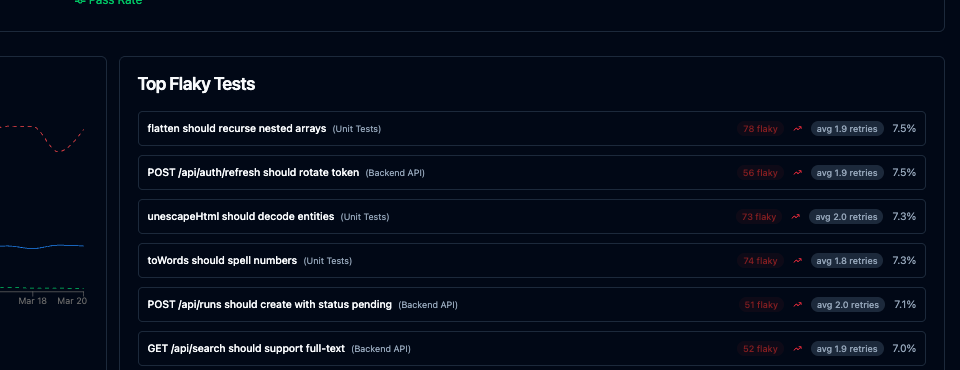
For each flaky test you can see the flakiness rate over a configurable time window, the first date the test was observed to be flaky, and the list of affected runs with links to the individual run results. This makes it straightforward to answer “did this test become flaky after that dependency upgrade?” or “has this test always been flaky, or did it start recently?”
The trend data is particularly useful for measuring remediation. After refactoring a test or increasing a timeout, you can watch the flakiness rate drop over subsequent runs rather than guessing whether the fix worked based on a handful of local runs.
Flaky tests tracked this way stop being a vague complaint — “the test suite is unreliable” — and become a specific list with rates, history, and enough context to prioritize fixes.
Setup: 3 Lines of Config
Install the reporter:
npm install -D @spechive/playwright-reporterAdd it to your Playwright config alongside any existing reporters:
// playwright.config.ts
import { defineConfig } from '@playwright/test';

export default defineConfig({
  retries: 2,
  reporter: [
    ['html'],
    ['@spechive/playwright-reporter', {
      projectToken: process.env.SPECHIVE_PROJECT_TOKEN,
    }],
  ],
});
Set SPECHIVE_PROJECT_TOKEN in your CI environment. The reporter runs alongside your existing setup — it does not replace the HTML reporter or change how your tests execute. Results are sent to SpecHive after each run.
What You See After a Few Runs
After a handful of CI runs, the dashboard begins to show patterns. Tests that required retries across multiple runs surface at the top of the flaky tests list with their rates and run counts. Tests that have been stable since tracking began are easy to filter out.
The dashboard gives you the full picture at a glance — pass rate trends, flaky test rankings, and run-level stats all in one view:
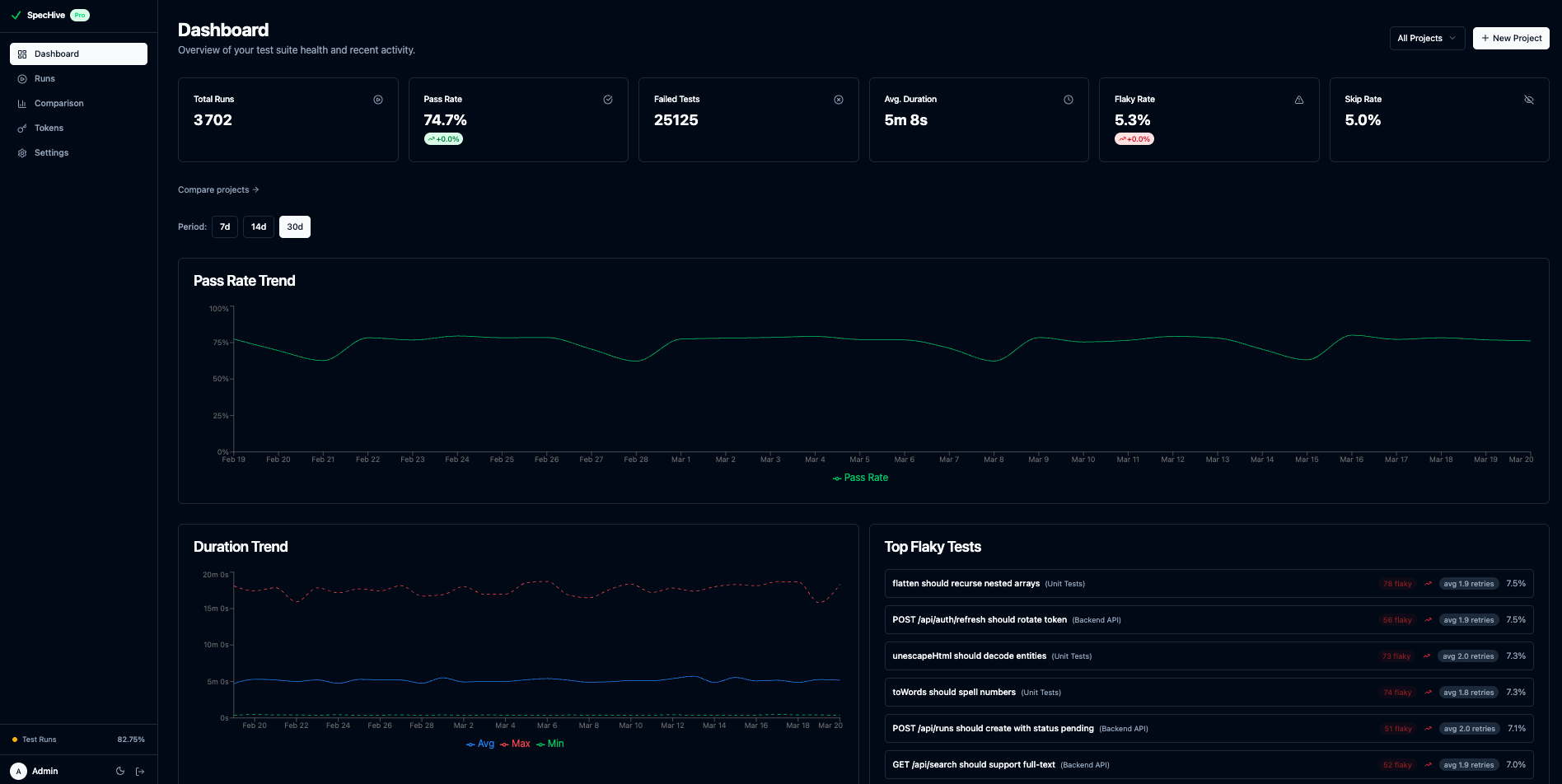
Because the data is aggregated across runs rather than scoped to a single execution, you can identify flaky tests that would be invisible in any individual pipeline — tests that fail rarely enough to never trigger an alert but frequently enough to waste meaningful CI time over weeks.
Getting Started
SpecHive’s free tier includes 5,000 test results per month on cloud, with no limits for self-hosted deployments. The reporter supports Playwright out of the box with no changes to your test files.
If you are setting up reporting from scratch, Setting Up Playwright Test Reporting in 5 Minutes covers the full initial configuration.
To get access to the flaky test dashboard and cross-run tracking, get started free.